Formal Event Procreate Color Palette
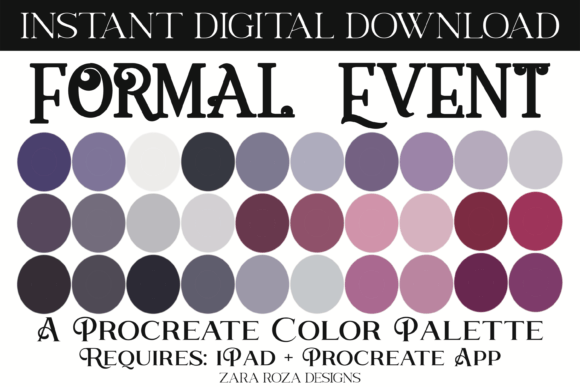
Digital artists often spend hours hunting for the perfect shade to convey a specific mood, only to find that their chosen colors clash or lack depth. This is particularly true when illustrating high-stakes scenarios like black-tie galas, elegant weddings, or sophisticated fashion spreads. The Formal Event Procreate Color Palette addresses this creative bottleneck by offering a curated collection of 30 distinct swatches designed specifically for the Procreate app on iPad, iPad Pro, and iPhone. Rather than relying on random color generation, this palette provides a structured foundation of pinks, reds, browns, grays, and jewel tones that capture the essence of formal aesthetics.
Why Curated Colors Matter in Digital Art
The difference between an amateur illustration and a professional piece often lies in color harmony. When creating art for formal events, the visual language must communicate elegance, sophistication, and timelessness. A haphazard selection of colors can unintentionally make a wedding invitation look casual or a fashion sketch appear dated. The Formal Event Procreate Color Palette solves this by pre-selecting tones that work together seamlessly. It includes a balanced mix of pastel lightness, dark shadows, and classic neutral grays, ensuring that every element in your composition feels intentional.
For professionals such as freelance illustrators, digital planners, and graphic designers, time is a critical resource. Spending minutes adjusting hue sliders for every new project adds up quickly. By utilizing a ready-made set of 30 swatches, you streamline your workflow significantly. This efficiency allows you to focus on the nuances of your line work, character design, or layout rather than getting bogged down in color theory basics. Whether you are sketching a bachelorette party concept or designing a bridal shower invitation, having a reliable color scheme at your fingertips ensures consistency across your portfolio.
Versatility Across Diverse Creative Projects
While the name suggests a focus on formal occasions, the utility of this palette extends far beyond evening gowns and tuxedos. The inclusion of rich jewel tones alongside soft pastels makes it remarkably versatile for various aesthetics, including boho, rustic, retro vintage, and even cute floral themes. For instance, the deep reds and browns found in the collection are perfect for creating warm, cozy illustrations for Thanksgiving or Christmas designs. Conversely, the lighter grays and pinks provide an ideal backdrop for Valentine's Day cards or delicate spring-themed artwork.
Creators working in character design will find particular value in the skin tone variations and fabric textures suggested by these colors. If you are drawing anime, manga, comics, or chibi characters attending a fictional gala, this palette offers the necessary range to render lighting and shadow effectively. The gray and brown tones help ground the image, while the jewel tones add pops of interest without overwhelming the viewer. This balance is essential for digital painting where maintaining visual hierarchy is key to guiding the audience's eye through the piece.
Practical Applications for Planners and Designers
Beyond traditional illustration, this INSTANT DIGITAL DOWNLOAD serves as a powerful tool for digital planners and stationery designers. Many users create custom stickers, journal covers, and planner layouts for special occasions. A cohesive color scheme is vital for these products to look polished and sellable. The Formal Event Procreate Color Palette ensures that your digital decor matches the theme of the event, whether it is a corporate holiday party or an intimate baby shower.
Consider a scenario where you are designing a makeup lookbook for a formal event. The palette's specific shades of pink and red can be used to simulate lipstick finishes, blush tones, and eyeshadow palettes with high accuracy. Similarly, for hand lettering projects, the contrast between the dark grays and the lighter background colors ensures readability and aesthetic appeal. By standardizing your color choices, you build a recognizable brand identity that clients can trust for their most important celebrations.
Who Benefits Most from This Tool?
This resource is particularly valuable for adults aged 20 to 50 who are navigating the intersection of creativity and commerce. Entrepreneurs selling digital goods on platforms like Etsy need high-quality assets to stand out in a crowded market. Educators teaching digital art classes can use this palette to demonstrate color theory principles in real-world contexts. Hobbyists looking to elevate their personal sketches will appreciate the guidance provided by a professionally selected set of tones.
Freelancers working under tight deadlines will find the immediate availability of the file crucial. Since it requires no waiting for shipping—being an instant download—you can start creating the moment you purchase. Small business owners managing their own marketing materials can maintain a consistent visual style across social media posts, flyers, and event invitations without hiring a full-time designer. The ability to switch between light, dark, and elegant modes within the same file system supports rapid prototyping and iteration.
Limitations and Considerations
While the Formal Event Procreate Color Palette is highly effective, it is important to understand its scope. This is a specialized tool designed for specific aesthetics; it may not be the primary choice for artists focusing on neon cyberpunk styles, ultra-realistic landscapes, or abstract expressionism that relies on chaotic color mixing. Additionally, the file format is specific to the Procreate ecosystem. Users must have an iPad, iPad Pro, or iPhone with the Procreate app installed to utilize the .swatches file directly. Those working solely on desktop software like Photoshop or Clip Studio Paint would need to convert the colors manually, which might negate some of the time-saving benefits.
Furthermore, while the palette provides a strong starting point, artistic intuition remains essential. Relying too heavily on any preset can sometimes lead to repetitive work. The best approach is to treat these 30 swatches as a foundation upon which you can layer your own adjustments. Use them to establish your base layers, then experiment with opacity, blending modes, and custom brushes to add unique texture and personality to your final piece.
How to Import Your New Palette
Getting started with your new color library is straightforward and integrates seamlessly into your existing workflow. Because this is a digital product, there is no physical packaging to wait for. Once you have purchased the file, follow these steps to get the colors onto your canvas:
- Navigate to your "Downloads" folder on your iPad or the specific location where you saved the file.
- Locate the .swatches file included in your package.
- Press firmly on the file. Your device should automatically recognize the file type and prompt you to open it in Procreate.
- Wait for the import process to complete. You will see a blue tick indicator confirming that the palette has been successfully imported.
- Open the Procreate app and tap the "Palettes" icon (the color wheel) on the top toolbar.
- Scroll to the very bottom of your list; your new "Formal Event" palette will be located there, ready for immediate use.
Final Thoughts on Elevating Your Workflow
In the world of digital creation, the right tools can transform a good idea into a great reality. The Formal Event Procreate Color Palette is more than just a collection of colors; it is a strategic asset for anyone looking to produce high-quality, aesthetically pleasing art efficiently. By removing the friction of color selection, it empowers creators to focus on what they do best: telling stories through visuals. Whether you are preparing for the upcoming holiday season, planning a wedding series, or simply exploring new artistic horizons, having a dependable, elegant color scheme at your disposal makes all the difference. Happy drawing.