Reflect Procreate Color Palette Guide
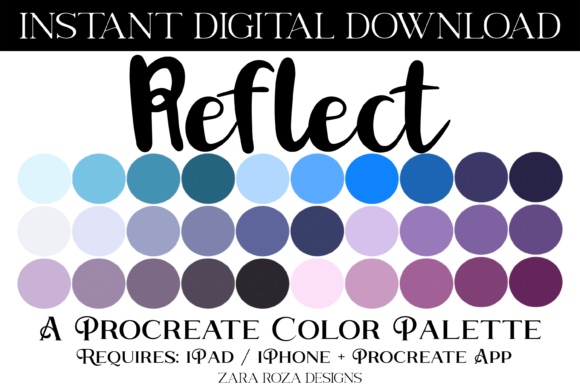
Digital artists often spend hours hunting for the perfect shade to bring their vision to life. The Reflect Procreate Color Palette solves this creative bottleneck by offering a curated collection of 30 distinct swatches designed specifically for the Procreate app on iPad. Whether you are sketching a quick landscape or planning a detailed digital wedding invitation, having a cohesive set of colors at your fingertips can transform your workflow from frustrating to fluid. This instant digital download provides a versatile foundation that bridges the gap between inspiration and execution.
A Versatile Collection for Every Season and Style
The true strength of the Reflect Procreate Color Palette lies in its diversity. Instead of limiting you to a single aesthetic, this .swatches file encompasses a broad spectrum of moods and themes. You will find soft pastel tones perfect for spring baby showers and gentle illustrations, alongside bold bright hues that pop in summer-themed posters. For those drawn to more subdued atmospheres, the palette includes deep dark academia shades and earthy natural tones reminiscent of a quiet forest floor.
Seasonal transitions are seamless with this collection. You can easily shift from the crisp whites and icy blues of Winter to the warm oranges and browns of Autumn. The inclusion of retro and vintage gradients adds a nostalgic touch, allowing you to create artwork that feels timeless. Whether you are capturing the calm reflection of a pond, the vibrant energy of an ocean wave, or the subtle ombre of a sunset sky, these 30 swatches cover the essential bases of color theory without overwhelming your canvas.
From Earthy Boho to Vibrant Gradients
Specific color trends are woven throughout the palette to ensure modern relevance. If you enjoy the boho aesthetic, you will appreciate the rich teals, turquoises, and dusty pinks included in the set. These colors work beautifully when layered with digital brushes to create texture and depth. The palette also features sophisticated grays and muted greens, which are ideal for creating calm and balanced compositions. These earthy tones ground your artwork, making them perfect for landscape art or nature-inspired designs.
For projects requiring a bit more drama, the gradient capabilities of these swatches shine. Transitioning from a deep purple to a soft pink or blending teal into turquoise becomes effortless. This is particularly useful for hand lettering and calligraphy projects where background gradients can make text stand out. The Apple Pencil responds beautifully to these varied tones, allowing for smooth shading and precise detailing that mimics traditional painting techniques.
Practical Applications for Creators and Planners
The utility of the Reflect Procreate Color Palette extends far beyond fine art illustration. It is an invaluable tool for anyone using their iPad for organization, design, or celebration. Digital planners rely heavily on consistent color coding to manage schedules and tasks effectively. By importing this palette into apps like Goodnotes, Notability, Noteshelf, or Xodo, you can maintain a unified aesthetic across your entire digital stationery suite.
Consider the practicality for event planning. Designing invitations for weddings, bridal showers, or birthday parties requires a specific mood. With this palette, you can instantly access the right combination of colors for a Valentine's Day card or a Halloween party flyer. The festive tones included make it easy to create holiday-specific art for Christmas, New Year, Easter, and Thanksgiving without starting from scratch. Small business owners and entrepreneurs can use these swatches to create cohesive branding materials, such as social media graphics, printable art prints, or decorative posters.
Enhancing Your Digital Scrapbooking and Decor
Digital scrapbooking has become a popular hobby, and color consistency is key to a polished look. The Reflect Procreate Color Palette offers the perfect mix of light and dark tones to highlight photos and journal entries. When creating aesthetic decor for your home or office, you can design custom posters that match your interior design scheme. The water, lake, and sky blue tones are especially effective for creating serene backgrounds that complement any room's atmosphere.
Educators and content creators can also benefit from this resource. Teachers designing worksheets or visual aids can use the retro vintage colors to engage students with visually appealing materials. Bloggers and marketers need high-quality visuals to capture attention, and having a pre-selected, harmonious color scheme ensures that every post looks professional. The ability to quickly switch between Spring freshness and Summer vibrancy keeps your content dynamic and seasonally relevant.
How to Import and Use Your Swatches
Getting started with the Reflect Procreate Color Palette is straightforward, thanks to the instant digital download format. Once you have purchased the file, you will receive a single .swatches digital file. This file is compatible exclusively with the Procreate app on iPad, iPad Pro, and iPhone devices running the necessary software version. It is important to note that this palette cannot be used in other drawing applications; it is optimized for the unique engine of Procreate.
Step-by-Step Import Instructions
- Locate the File: Open the "Files" app on your iPad or navigate to the location where you downloaded the purchase. Look for the folder containing the .swatches file.
- Select the Palette: Press firmly on the .swatches file to open the options menu.
- Share to Procreate: Tap the "Share" icon (usually a square with an arrow pointing up) and select "Copy to Procreate" from the list of available apps.
- Access in App: Open the Procreate app. Navigate to the Color panel, tap the "+" icon to add a new palette, and you will see your newly imported "Reflect" palette ready to use.
Important Considerations Before You Begin
Before integrating the Reflect Procreate Color Palette into your workflow, there are a few technical details to keep in mind. First and foremost, ensure your device meets the requirements. You must have an iPad, iPad Pro, or iPhone with the Procreate app installed. While the palette works on all supported iOS devices, the full experience is best enjoyed on an iPad with an Apple Pencil, where pressure sensitivity allows for nuanced color application.
Additionally, remember that this is a digital product. There are no physical items shipped to your door. Upon purchase, you gain immediate access to the download link. This makes it an excellent solution for last-minute project needs or spontaneous creative bursts. Because the file contains 30 carefully selected swatches, it is not meant to replace your entire color library but rather to serve as a reliable go-to for specific projects or styles.
Finally, consider how these colors interact with your chosen brushes. The painting color scheme works exceptionally well with wet-on-wet brushes, while the lettering tones are sharp and clean with monoline pens. Experimenting with different brush settings can unlock even more potential within the Reflect Procreate Color Palette. Whether you are a beginner looking to learn color harmony or a professional seeking efficiency, this tool provides a solid foundation for your next masterpiece. Happy drawing!