Unlocking Creative Potential with the Platformer Procreate Color Palette
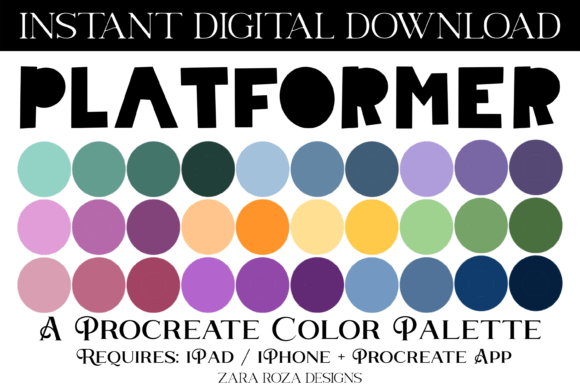
In the expansive ecosystem of digital art tools, the choice of color often dictates the mood, depth, and overall success of an illustration. For artists working within the Apple ecosystem, specifically those utilizing the Procreate app on iPad or iPhone, the Platformer Procreate Color Palette offers a curated selection designed to bridge the gap between nostalgic video game aesthetics and modern digital painting techniques. This collection is not merely a set of random hues; it is a structured system of 30 distinct swatches engineered to support a wide array of creative workflows, from hand lettering to complex scene composition.
The Aesthetic Philosophy Behind the Swatches
The core identity of this palette lies in its name: "Platformer." This references the classic side-scrolling video games that defined a generation of gaming culture. These games were characterized by vibrant, high-contrast environments that needed to be readable on smaller screens while remaining visually engaging. The Platformer Procreate Color Palette captures this essence by blending pastel softness with bold, bright accents. It moves beyond simple primary colors to include sophisticated variations like sage green, terracotta brown, and deep ocean blue.
When an artist selects a color scheme, they are essentially setting the emotional tone for their project. This specific palette provides a gradient-like flow through the spectrum, incorporating rainbow tones without feeling chaotic. The inclusion of teal, turquoise, and warm oranges creates a natural balance between cool and warm temperatures. This balance is crucial for digital illustration, as it allows for the creation of ombre effects and atmospheric depth without requiring the artist to manually mix dozens of intermediate shades. Whether the goal is to evoke the serene calm of a sunrise or the energetic chaos of a festive celebration, these 30 swatches provide a robust foundation.
Versatility Across Digital Art Genres
One of the most significant advantages of this digital asset is its adaptability across different artistic disciplines. While the name suggests a focus on game design, the application extends far beyond pixel art. The smooth transitions between light and dark shades make it exceptionally well-suited for hand lettering and typography. When using an Apple Pencil on an iPad Pro, the pressure sensitivity combined with these pre-mixed tones allows for fluid strokes that mimic traditional ink or watercolor.
For instance, creating wedding invitations or bridal shower cards often requires a delicate touch. The pastel elements within the palette, such as soft yellows and muted greens, provide a gentle backdrop that complements intricate calligraphy. Conversely, the darker terracotta and ocean blue tones offer the necessary contrast for headlines and borders, ensuring legibility and visual hierarchy. This duality makes the palette a powerful tool for commercial designers who need to switch quickly between whimsical designs and professional branding materials.
Optimizing Workflows for Festive and Seasonal Projects
Seasonal creativity demands efficiency. Designers often face tight deadlines when producing assets for holidays like Christmas, Halloween, Easter, or Valentine's Day. The Platformer Procreate Color Palette streamlines this process by offering a cohesive set of colors that can be immediately applied to holiday-themed projects. Instead of spending hours searching for the perfect shade of pumpkin orange for Thanksgiving or a specific crimson for New Year's Eve celebrations, the artist has immediate access to these tones.
Consider the workflow for creating birthday party cards or festive posters. The palette includes bright, celebratory colors that pop against white backgrounds, essential for printable art prints. The gradient capabilities inherent in the arrangement of the swatches allow artists to create dynamic backgrounds that shift from light to dark, adding a sense of movement and excitement to static images. This is particularly useful for digital scrapbooking, where layering textures and colors is key to telling a story.
Furthermore, the aesthetic appeal of these colors translates well to digital planning applications. Users of Goodnotes, Notability, Noteshelf, and Xodo often seek aesthetically pleasing planners that inspire organization. By importing this palette into their digital environment, users can customize their planner covers, stickers, and bullet points with a consistent, harmonious look. The sage green and turquoise tones, in particular, are popular in the "aesthetic decor" trend, bringing a sense of calm and order to digital workspaces.
Technical Implementation and Compatibility
The technical simplicity of the product is one of its greatest strengths. The download consists of a single .swatches file containing exactly 30 color stops. This format is native to the Procreate app, ensuring seamless integration without the need for third-party converters or complex installation procedures. It is important to note that this resource is exclusively compatible with the Procreate app on iPad and iPhone devices. It does not function on desktop software like Photoshop or Clip Studio Paint unless converted through external means, which may alter the precise hex values.
The import process is designed to be intuitive. Once the user downloads the file to their device, typically into the Files app, tapping the .swatches file triggers an automatic handoff to Procreate. The app recognizes the file type and begins the import sequence immediately, displaying a progress indicator until the new palette is available in the library. This instant digital delivery model eliminates shipping times and physical media costs, allowing creators to begin working within minutes of purchase.
Strategic Application in Professional Illustration
For professional illustrators and business owners, consistency is paramount. Developing a brand identity often involves selecting a limited color range that appears across all marketing materials. The Platformer Procreate Color Palette serves as an excellent starting point for brands looking to establish a playful yet professional image. The combination of earthy tones like terracotta with vibrant accents like yellow and orange creates a grounded yet energetic feel.
In the realm of education and research, clear visual communication is essential. Educators creating digital lesson plans or researchers designing infographics can utilize these colors to categorize information effectively. The distinct separation between the light pastels and the darker shades helps in distinguishing headers from body text or highlighting key data points. The inclusion of rainbow gradients also aids in teaching color theory concepts, demonstrating how complementary colors interact when placed adjacent to one another.
Moreover, the palette supports the creation of vector-style artwork even within a raster-based environment like Procreate. By using the hard edge brushes in conjunction with these solid, flat colors, artists can achieve a clean, graphic look reminiscent of modern UI design. This versatility makes the palette a valuable asset for app developers and web designers who sketch prototypes directly on their iPads before moving to code.
Enhancing the Digital Planning Experience
The rise of digital planning has created a niche market for aesthetic resources that enhance productivity. The Platformer Procreate Color Palette fits perfectly into this ecosystem. Digital planners rely heavily on color coding to manage tasks, schedules, and goals. The 30 swatches provide enough variety to assign unique colors to different categories—such as personal, work, health, and finance—without overwhelming the user with too many options.
The specific inclusion of ombre tones allows for more sophisticated planner designs. Instead of flat blocks of color, users can create subtle shifts in hue that add depth to their digital pages. This is particularly effective when using the Apple Pencil to draw custom dividers or decorative elements. The tactile feedback of the stylus on the iPad screen, paired with the rich saturation of these colors, replicates the joy of using physical markers and gel pens, but with the added benefit of undo functions and infinite layers.
Maximizing Creativity with Limited Palettes
There is a common misconception among beginners that having more colors leads to better art. In reality, limiting one's palette often forces greater creativity and results in more cohesive compositions. The Platformer Procreate Color Palette operates on this principle. By restricting the artist to 30 carefully chosen hues, it encourages experimentation with value, texture, and composition rather than relying on an endless spectrum of choices.
This limitation is beneficial for hobbyists and professionals alike. It reduces decision fatigue, allowing the artist to focus on the act of drawing and painting. The pre-selected combinations ensure that any two colors picked from the palette will likely harmonize, reducing the risk of clashing tones. This reliability is invaluable during quick brainstorming sessions or when working under strict client deadlines.
Ultimately, the value of this digital asset lies in its ability to serve as a reliable partner in the creative process. Whether you are illustrating a baby shower invitation, designing a poster for a local event, or simply doodling for fun, the colors provided offer a consistent quality and aesthetic appeal. The blend of nostalgic video game vibes with contemporary digital art trends ensures that the work remains fresh and engaging.
As the digital art community continues to grow, tools that simplify the technical aspects of creation while enhancing artistic expression become increasingly important. The Platformer Procreate Color Palette stands out as a practical, efficient, and inspiring resource for anyone looking to elevate their digital illustrations on the iPad. By leveraging these 30 swatches, artists can unlock new levels of creativity, bringing their visions to life with confidence and style.