Embroidery Photoshop Action for Designers
In a digital landscape often dominated by sleek minimalism, the tactile warmth of stitched textures offers a unique way to capture attention and convey authenticity. An Embroidery Photoshop Action transforms flat vector shapes or pixel layers into rich, textured visuals that mimic real-world craftsmanship, instantly elevating your creative assets from generic to premium. This tool is not just a filter; it is a powerful workflow accelerator that allows designers to infuse their branding with personality and depth in seconds.
Elevating Brand Identity with Textured Visuals
Modern graphic design relies heavily on visual hierarchy and texture to guide the viewer's eye and communicate brand values. When applied to logo design or typography, an embroidery effect adds a layer of sophistication that suggests quality and care. Whether you are working on packaging design where physical texture matters, or digital marketing materials where visual interest drives engagement, this technique bridges the gap between the digital and the tangible.
The versatility of this action lies in its ability to work with any language, making it an essential asset for global brands. From English headlines to complex Asian characters or Arabic calligraphy, the stitching algorithm adapts seamlessly. This multilingual capability ensures that your brand identity remains consistent across different markets without compromising the aesthetic integrity of your typography.
Practical Applications Across Media
The utility of these creative assets extends far beyond simple logo makeovers. Here is how integrating this effect can enhance various aspects of your design workflow:
- Social Media Graphics: Create eye-catching posts that stand out in crowded feeds by turning standard text overlays into colorful, embroidered stickers.
- Merchandise and Packaging: Preview how logos will look on physical products like t-shirts, hats, or product labels before sending them to production.
- Web and UI Design: Add subtle texture to buttons, icons, or mascots to improve user experience (UX) through visual delight.
- Editorial Layouts: Use embroidered elements as decorative accents in magazines or blogs to break up text and add modern aesthetics.
Flexibility and Creative Control
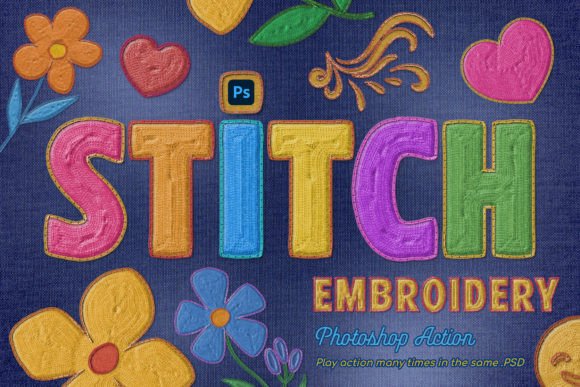
One of the most significant advantages of this specific action is its non-destructive nature. You can play the action many times within the same PSD file, allowing you to build complex, colorful compositions layered with multiple embroidery elements. Unlike static filters, this approach gives you total control over the final output. You can choose any colors for the border and embroidery fill, ensuring perfect alignment with your existing color palette.
This flexibility is crucial for maintaining consistency in brand identity. By selecting specific thread colors for stitches, you can create tons of unique embroidery stickers that align with seasonal campaigns or specific product lines. The ability to turn logos, texts, icons, and mascots into cool embroidery stickers means you can maintain a cohesive visual style across all touchpoints, from business cards to website headers.
Seamless Integration into Your Workflow
Efficiency is key in professional design, and this tool is built to fit seamlessly into both PC and Mac environments. It works with virtually any layer type, including:
- Text layers for dynamic typography
- Vector shapes for crisp logo scaling
- Pixel layers for photo manipulation
- PNG images for quick integration
- Smart objects for maximum editability
- Folder groups for organized project management
This compatibility ensures that you don't need to alter your current design process. You can apply the effect directly to your existing assets, saving hours of manual masking and texturing. The package typically includes an ANT file for the action, PAT files for patterns, ABR brushes for custom touches, a PSD template for an easy start, and a PDF help file with font links and instructions. Video instructions further ensure that even those new to advanced Photoshop techniques can achieve professional results immediately.
Strategic Use for Maximum Impact
While the technical ease of use is impressive, the strategic application is what truly defines success. When using embroidery effects, consider readability and scalability. Ensure that the stitch density does not obscure fine details in small logos or intricate typography. In web design and UI contexts, balance the texture so it enhances the interface without overwhelming the content. For print design, the texture adds a perceived value that can justify higher price points on merchandise or premium packaging.
Ultimately, thoughtful design choices define how a brand is perceived. Quality creative assets like an Embroidery Photoshop Action do more than just decorate; they communicate a story of craftsmanship and attention to detail. By leveraging these tools, designers can create compelling visual narratives that resonate with audiences, strengthen brand loyalty, and deliver a polished, professional presentation across every medium.